
SAN Storage (Storage Area Network) Solutions
SAN storage gives several servers fast, shared access to the same pool of block storage over a dedicated network. We design and install iSCSI and Fibre Channel SANs for virtualisation, databases and other workloads that cannot afford slow disks or downtime.
Get a free consultation
Share your storage requirement and our team will call you back within one working day.
Overview
What is SAN storage?
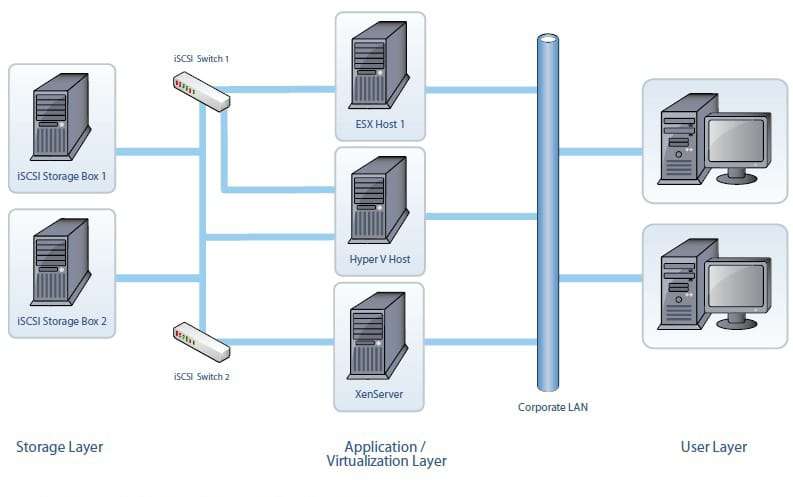
SAN storage, short for storage area network, is a dedicated high-speed network that connects servers to shared block storage. To each server, SAN storage looks like a local disk, but it lives on central storage arrays that many servers use at once.
Because storage traffic runs on its own network, a SAN keeps the office LAN free and gives low latency, high throughput and features such as snapshots, replication and failover. That makes it the usual choice for VMware and Hyper-V clusters and busy databases.
- Shared block storage for server clusters
- Separate network for storage traffic
- Snapshots, replication and failover
What We Deliver
SAN storage solutions
Fibre Channel SAN
Low-latency Fibre Channel fabrics with switches and HBAs for mission-critical storage.
iSCSI SAN
Block storage over standard Ethernet, a cost-effective SAN for small and mid-size setups.
All-flash arrays
NVMe and SSD arrays for databases, ERP and virtual desktops that need high IOPS.
Hybrid arrays
Flash for hot data plus disk for capacity, for mixed workloads at a lower cost per terabyte.
Snapshots and replication
Point-in-time copies and replication to a second site for quick recovery.
Monitoring and support
Health monitoring, firmware updates and capacity reviews after go-live.
Compare
SAN vs NAS storage
SAN
Block-level storage on a dedicated network. Servers see it as a local disk. Best for virtual machines and databases.
NAS
File-level storage on the normal network. Users see shared folders. Best for documents, media and backups. See NAS storage.
How We Build It
How we build your SAN
Assess
We measure IOPS, throughput and capacity from your current servers.
Design
We choose iSCSI or Fibre Channel, array type, switches and redundancy.
Deploy
We install the fabric and arrays, set up LUNs and connect hosts.
Migrate
We move virtual machines and data, then test failover.
Why Tech Guru
Shared storage that stays available
Since 2016 we have supplied and supported servers and storage for businesses across India. We build SANs with dual controllers, redundant paths and switches, designed for 99.9% uptime of the systems that run on them.
- iSCSI and Fibre Channel design experience
- Redundant controllers, paths and switches
- Sizing based on measured IOPS
- Migration of existing virtual machines included
FAQs
SAN Storage FAQs
SAN Storage FAQs
What is SAN storage?
SAN storage is shared block storage reached over a storage area network, a dedicated high-speed network that connects servers to central storage arrays.
What is the full form of SAN in storage?
SAN stands for storage area network.
What is the difference between SAN and NAS?
SAN provides block storage that servers treat as local disks over a dedicated network. NAS provides shared files and folders over the normal office network.
Should I choose iSCSI or Fibre Channel?
iSCSI runs on Ethernet and costs less, which suits most small and mid-size setups. Fibre Channel gives the lowest latency and suits large, mission-critical workloads.
Do I need a SAN for VMware or Hyper-V?
Clustered VMware or Hyper-V hosts need shared storage for features like live migration and high availability. A SAN is the most common way to provide it.
Talk to an Expert
Planning a SAN for your servers?
Share your server and workload details. We will design the right SAN and send a quote.
Have any questions?
We reply within 24 hours
Mon to Fri, 11:00 AM to 6:30 PM
Working hours